TerraX: one place to run OpenTofu / Terraform across AWS, Azure, GCP and Cloudflare.
A self-hosted web platform that sits on top of OpenTofu / Terraform and adds what a team needs around it: providers with encrypted credentials, plan review and approval, drift detection, compliance checks, cost analysis and a full resource inventory.
Spring Boot (Java 21) API, Angular web UI, PostgreSQL. Runs with docker compose up -d.
The problem
Terraform itself is rarely the bottleneck. Everything around it is.
Scattered state and credentials
State backends spread across clouds, cloud keys living on laptops, and no single view of what each provider manages.
No shared record of changes
Who ran which plan, who approved it, and what actually changed is buried in terminal history and CI logs.
Drift, policy and cost come later
Drift, compliance and spend are checked by separate tools, if at all, long after the apply.
Glue scripts between steps
The gap between "infrastructure provisioned" and "things configured on it" gets filled with Bash nobody wants to maintain.
What TerraX does
Every feature below exists in the TerraX code today.
Provider-first model
Each cloud account is a provider object with its own credentials (stored encrypted) and its own isolated state, so one broken state file never touches another cloud.
Plan and apply with OpenTofu
Plans and applies run through OpenTofu on standard Terraform HCL, and the raw plan output is shown for every run.
Review and approval
Plans go through a review queue; auto-approve can be limited to plans with no deletions, or no deletions and no replacements.
Drift detection
A scheduled daily drift check compares live cloud resources with the managed baseline and notifies only when drift is found.
Policy and compliance checks
Checkov scans, OPA policy templates, tag policies, and PCI DSS and SOC 2 assessment views.
Resource explorer
A searchable inventory of every cloud resource, grouped by service and type, refreshed on demand or daily.
Cost analyzer
Org-wide spend by day, month, account, service and tag, including AWS Organizations, with Word (.docx) report export.
Workflows and script functions
Chain Terraform runs with script functions run in Docker, and pass each step's outputs to the next without copy-paste.
Kubeconfig and Argo CD
Generate kubeconfigs for EKS, GKE and AKS from the stored provider credentials, and manage Argo CD from the same UI.
Bring existing infrastructure in
Import existing Terraform state, import organizations and workspaces from HCP Terraform, or stage resources from the cloud consoles with the TerraX browser extensions.
Teams, roles and audit trail
Role-based access, teams, OIDC / Okta single sign-on, MFA, and an audit trail of who did what.
AI assistant
An optional in-app assistant for authoring and explaining infrastructure, enabled with your own Anthropic API key.
Supported clouds
Every provider is optional; its features stay hidden until you configure it.
- AWS
- Microsoft Azure
- Google Cloud
- Cloudflare
- Kubernetes
Cloudflare coverage is the deepest: the UI has create and list screens for well over a hundred Cloudflare resource types, from DNS and WAF rules to Workers, R2 and Zero Trust.
What it looks like
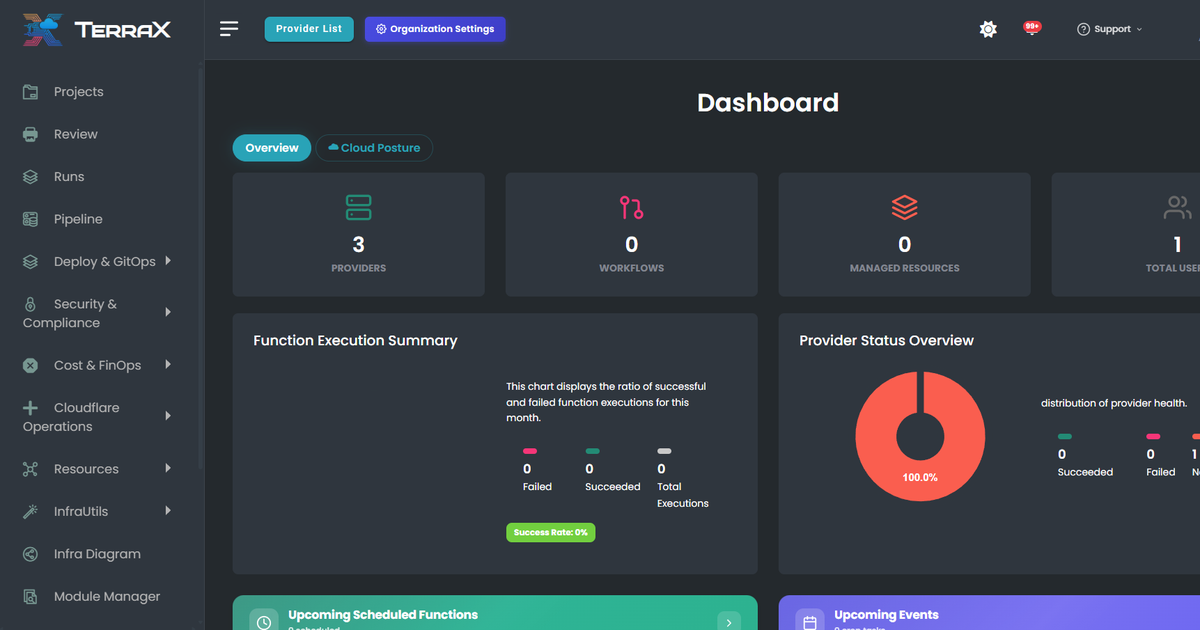
The dashboard of a fresh local install.
How it works
A browser UI, a REST API, a database, and OpenTofu doing the actual work.
- Connect a provider.Add an AWS, Azure, GCP or Cloudflare account in the UI. Keys and roles are stored encrypted, and each provider gets its own state.
- Describe or import.Define resources in the UI, use blueprints, or import what already exists from state files, HCP Terraform or the cloud consoles.
- Plan, review, apply.The Spring Boot API prepares the workspace and runs OpenTofu. The plan goes to review, and the apply runs once it is approved.
- Keep watching.Daily drift checks, compliance scans and cost reports keep running against the same providers after the apply.
Browser ── Angular UI ──REST──▶ Spring Boot API ──JDBC──▶ PostgreSQL
                                     │
                                     └──▶ OpenTofu / Terraform · cloud provider SDKs
Open-source release (Apache 2.0) coming soon
TerraX will be published as a single open-source repository with a docker compose quick start. Want to know when it is out, or see a demo first?
Email terraxcloudhq@gmail.com. One email when the repository is public; nothing else.
Need help running Terraform at scale? TERRAX consulting
Fixed-price AWS cost audits, EKS upgrades and multi-account setups in Terraform, from the same team.
See TERRAX consulting